
In 2024, a Philippine bank lost customer data because an employee's compromised laptop had full access to the core banking system. The attacker moved laterally across the network in 11 minutes. Zero Trust would have stopped them at step one - the laptop wasn't verified, so it shouldn't have had access to anything.
Zero Trust isn't a product you buy. It's an architecture you build. Here's how to do it systematically.
What is Zero Trust Network Architecture?
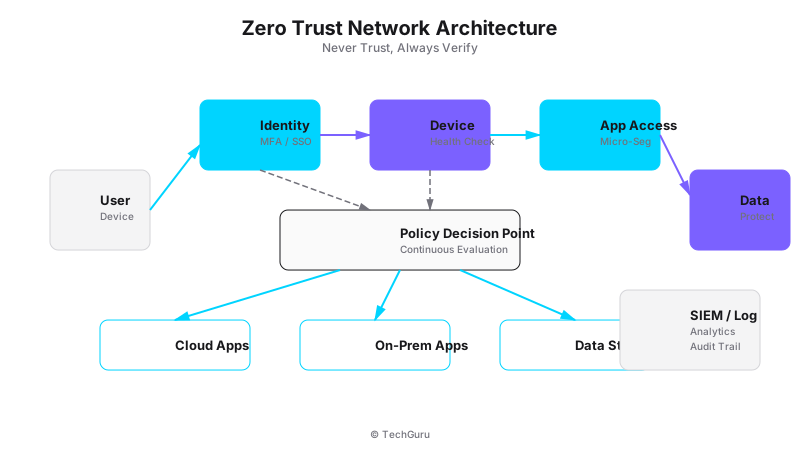
[Architecture Diagram: /images/blog/zero-trust.svg]
Zero Trust is a security model built on one principle: never trust, always verify. Every user, device, and connection must prove it's authorized before accessing any resource. There's no 'trusted' zone inside the network.
Traditional security assumes everything inside the firewall is safe. Zero Trust assumes everything is potentially compromised. This fundamental shift changes how you design every aspect of your network.
Why Zero Trust Matters in 2025
Three trends make Zero Trust essential:
Remote work: 60% of employees work outside the traditional office at least part-time. You can't trust the network they're on.
Cloud migration: Applications live in AWS, Azure, SaaS platforms. The corporate network is no longer the center of gravity.
Sophisticated attacks: Attackers bypass firewalls using stolen credentials, compromised devices, or supply chain attacks. Perimeter security alone isn't enough.
The NIST Zero Trust Architecture (SP 800-207) standard is now referenced in multiple compliance frameworks. If you need to meet regulatory requirements, Zero Trust is increasingly mandatory.
How to Implement Zero Trust: 5 Phases
Phase 1: Identify Your Protect Surfaces
A protect surface is the opposite of an attack surface - it's the critical data, applications, assets, and services (DAAS) you need to protect. Start by cataloging:
Data: Customer databases, financial records, intellectual property. Applications: ERP, CRM, email, file shares. Assets: Servers, workstations, IoT devices. Services: DNS, DHCP, Active Directory.
Most organizations have 5-10 critical protect surfaces. Don't try to protect everything equally - focus on what matters most.
Phase 2: Map Transaction Flows
For each protect surface, map how traffic flows: Who accesses it? From where? Using what device? What protocols? We use FortiGate's traffic logging and FortiAnalyzer to build these maps.
You'll be surprised how much unauthorized or unnecessary traffic you find. One client discovered their POS system was communicating with a developer's test server. That shouldn't have been possible.
Phase 3: Design the Zero Trust Architecture
Build micro-perimeters around each protect surface using:
Identity: MFA for all users. Certificate-based authentication for devices. Role-based access control (RBAC) for authorization.
Network: Microsegmentation using VLANs and firewall policies. Every segment is a separate trust zone. East-west traffic is inspected, not just north-south.
Device: Device posture checks. Is the OS patched? Is antivirus running? Is the disk encrypted? Non-compliant devices get quarantined.
Phase 4: Implement Policy Engine
The policy engine makes real-time access decisions based on: Who is asking (identity)? What device are they using? What's the device posture? Where are they? What time is it? What are they trying to access?
FortiGate supports this through dynamic access policies. You can create rules like: 'Allow access to Finance app only from corporate devices with updated OS, during business hours, from approved locations.'
Phase 5: Monitor and Iterate
Zero Trust is not a one-time project. Continuously monitor access logs, review policies quarterly, and adjust based on new threats and business changes.
Use FortiAnalyzer or a SIEM to detect anomalies: unusual access patterns, failed authentication attempts, devices accessing resources they've never touched before.
Best Practices
1. Start with identity. MFA alone stops 99% of credential attacks. This is the highest-impact, lowest-effort starting point.
2. Implement in phases. Don't try to Zero Trust everything at once. Start with your most critical protect surface.
3. Use existing tools. FortiGate's zones, VLANs, and policies already support Zero Trust principles. You may not need new hardware.
4. Document everything. Zero Trust requires clear policies. If you can't explain who should access what, your policies need work.
5. Train your staff. Zero Trust changes how users work. They'll need to authenticate more often and may lose some convenience.
Common Mistakes
Mistake 1: Buying a 'Zero Trust' product and calling it done. Zero Trust is an architecture, not a product. No single tool gives you Zero Trust.
Mistake 2: Making it too restrictive. If users need to authenticate 10 times to do their job, they'll find workarounds. Balance security with usability.
Mistake 3: Ignoring device trust. User identity isn't enough. A compromised device with valid credentials is still dangerous. Check device posture too.
Conclusion
Zero Trust is the future of network security. Start with MFA, then build from there. The journey takes 6-12 months for a typical enterprise, but each phase improves your security posture. The investment pays for itself the first time it stops an attack.
Next step: Audit your current access policies. Can you list every user, device, and application that has access to your most sensitive data? If not, that's where to start.
Want to go deeper? Explore [Protect security services](/en/products/protect), [industry solutions](/en/solutions), or [get a security assessment](/en/contact).
FAQ
Q: How long does Zero Trust implementation take? A: Phase 1 (identity + MFA): 1-2 months. Full implementation: 6-12 months. It's a journey, not a destination.
Q: Do I need to replace my existing firewall? A: Not necessarily. FortiGate and other modern firewalls support Zero Trust principles. You may need to reconfigure rather than replace.
Q: Is Zero Trust only for large enterprises? A: No. SMBs benefit equally. A 50-person company with FortiGate can implement basic Zero Trust (MFA + segmentation) in weeks.
Q: Does Zero Trust slow down users? A: Initial implementation may add friction (more authentication prompts). But good Zero Trust design minimizes user impact while maintaining security.
Threat Landscape and Current Attack Vectors
Understanding the current threat landscape is essential for making informed security decisions. In 2025, the most common attack vectors include ransomware (up 150% from 2024), supply chain attacks (targeting software vendors and managed service providers), credential stuffing (exploiting password reuse across services), and zero-day exploits (targeting unpatched vulnerabilities).
According to the 2025 Verizon Data Breach Investigations Report, 68% of breaches involve a human element (phishing, stolen credentials, or errors). This means technology alone is not enough - you need people, processes, AND technology working together.
Implementation Roadmap
We recommend a phased approach to implementation. Phase 1 (Weeks 1-4): Assessment and design. Document current state, identify gaps, design target architecture. Phase 2 (Weeks 5-8): Deploy core components. Install and configure the primary solution in a test environment. Phase 3 (Weeks 9-12): Pilot testing. Deploy to 20-30% of users, collect feedback, refine configuration.
Phase 4 (Weeks 13-16): Full deployment. Roll out to remaining users with minimal disruption. Phase 5 (Weeks 17-20): Optimization. Fine-tune policies, optimize performance, and document procedures. This timeline works for most medium enterprises (200-500 users).
Compliance and Regulatory Considerations
If your organization is subject to regulatory requirements (PCI DSS, HIPAA, ISO 27001, GDPR), ensure your implementation addresses these requirements from the start. Retrofitting compliance is significantly more expensive than building it in. We recommend creating a compliance matrix that maps each regulatory requirement to specific technical controls.
Common compliance gaps we see: insufficient audit logging (PCI DSS requires 12 months of logs), missing encryption at rest (required by HIPAA and GDPR), inadequate access controls (required by ISO 27001), and missing incident response procedures (required by all frameworks).