
The call came at 4:15 AM. A hospital's primary data center had a coolant leak. The server room was flooding. Not metaphorically — literally flooding. Water was pooling around the server racks.
The IT team initiated VMware SRM failover. Tier 1 workloads (EHR, lab systems, pharmacy) failed over to the DR site in 8 minutes. Tier 2 (imaging, billing) followed in 20 minutes. By 5:00 AM, the hospital was fully operational from the DR site. Total cost of the disaster: 2.3M PHP for the water damage to the primary site. Cost of the DR failure: zero. Patient care continued uninterrupted.
That was the third time SRM saved this client from a major disaster. Each time, the failover was faster than the last — because each time, we learned something and improved the configuration.
This guide is the accumulated knowledge from deploying SRM across 20+ Philippine enterprises over 6 years. It goes beyond the standard VMware documentation into the decisions, trade-offs, and real-world configurations that make the difference between an 8-minute failover and a 2-hour panic.
SRM Architecture: The Decisions That Matter
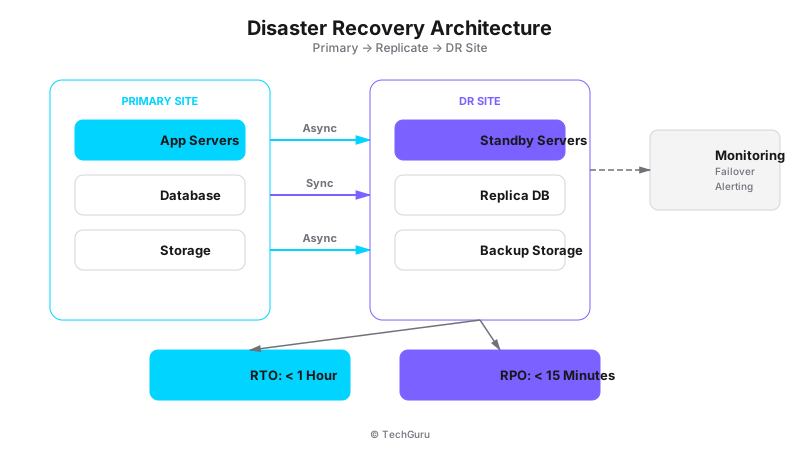
[Architecture Diagram: /images/blog/disaster-recovery.svg]
SRM deployment is not one-size-fits-all. The architecture decisions you make early determine how well SRM performs when you need it most.
Decision 1: Single-Site vs Multi-Site SRM
Single-site SRM: one vCenter at the primary site, one vCenter at the DR site, one SRM pair. This is the standard deployment and works for most scenarios.
Multi-site SRM: multiple primary sites connecting to a single DR site. This is common for organizations with multiple data centers that all need DR protection. The complexity increases significantly — you need to manage multiple protection groups, handle conflicting RPO requirements, and plan for scenarios where multiple primary sites fail simultaneously.
Our recommendation: start with single-site SRM. Only move to multi-site if you genuinely have multiple primary sites. Multi-site is 3x more complex to manage.
Decision 2: Synchronous vs Asynchronous Replication
Synchronous replication: data is written to both primary and DR sites simultaneously. Zero data loss (RPO = 0). But requires low-latency, high-bandwidth connectivity between sites (< 5ms latency, >= 1 Gbps).
Asynchronous replication: data is written to the primary site first, then replicated to DR. Small data loss window (RPO = 5-15 minutes typical). Works over standard WAN connections.
Our recommendation: use async for 90% of workloads. Only use sync for the most critical databases where zero data loss is a regulatory requirement. Sync replication doubles your storage costs and requires expensive network infrastructure. Most Philippine enterprises use async with a 15-minute RPO.
Decision 3: vSphere Replication vs Array-Based Replication
vSphere Replication (VR): software-based replication included with SRM. Runs as a virtual appliance on each ESXi host. No storage vendor involvement required.
Array-based replication: uses storage array features (NetApp SnapMirror, Dell RecoverPoint, etc.) to replicate at the storage level. Faster, more efficient, but requires matching storage arrays at both sites.
Our recommendation: use vSphere Replication unless you have a compelling reason for array-based. VR is simpler, cheaper, and sufficient for most workloads. We have seen clients save 40-50% on DR infrastructure by choosing VR over array-based replication.
Network Design for SRM
Network design is where most SRM deployments succeed or fail. Get this right, and everything else is straightforward. Get this wrong, and you will be debugging network issues during your next disaster.
The SRM network has four functional components:
1. Management network: used by SRM for communication between the primary and DR sites. Must be reliable and low-latency. We recommend a dedicated VLAN for SRM management traffic.
2. Replication network: used by vSphere Replication to transfer VM data. This is the highest-bandwidth requirement. For a 15-minute RPO with 2TB of change data, you need approximately 20 Mbps sustained upload.
3. VM network: the networks your VMs use. After failover, VMs need to be reachable on the DR site. This requires careful IP planning.
4. Heartbeat network: used by vCenter and SRM to detect failures. This can share the management network.
IP address planning is critical. There are two approaches:
Static IP: VMs keep the same IP addresses at the DR site. This requires network routing changes (BGP or static routes) to redirect traffic to the DR site after failover. Simpler for applications, more complex for networking.
IP customization: SRM automatically changes VM IP addresses during failover. The VM gets a new IP at the DR site, and DNS is updated to point to the new IP. More complex for applications (some apps cache IP addresses), simpler for networking.
Our recommendation: use static IPs with network routing for Tier 1 workloads. Use IP customization for Tier 2/3. This gives you the best of both worlds — fast failover for critical systems, simplified management for everything else.
Replication Configuration Deep Dive
Replication is the heart of SRM. Getting the configuration right determines your RPO, failover time, and bandwidth requirements.
Replication groups: organize VMs into protection groups based on recovery priority, not department structure. A typical hospital might have: Group 1 (EHR + Lab + Pharmacy), Group 2 (Imaging + Billing), Group 3 (Email + File Servers).
RPO settings: this is the maximum amount of data you are willing to lose. Lower RPO = more replication traffic = more bandwidth needed.
RPO 5 minutes: requires 4x the bandwidth of RPO 15 minutes. Only for the most critical workloads.
RPO 15 minutes: our standard recommendation. Balances data protection with bandwidth cost.
RPO 1 hour: acceptable for Tier 3 workloads. Significant bandwidth savings.
Snapshot scheduling: SRM uses snapshots to capture point-in-time data for replication. The snapshot frequency must align with your RPO. For RPO 15 minutes, snapshots every 15 minutes.
Quiescing: for databases and applications that need consistent snapshots, enable guest OS quiescing. This uses VMware Tools to flush writes to disk before taking the snapshot. Without quiescing, you may get crash-consistent snapshots that require database recovery after failover.
Bandwidth calculation: the formula we use is (Daily Change Rate x Replication Window) / (RPO x Available Bandwidth). For a typical hospital with 1TB of protected VMs and 10% daily change rate, RPO 15 minutes requires approximately 15-20 Mbps sustained bandwidth.
Failover Planning and Execution
Failover is not a button you press in panic. It is a planned, documented, tested procedure.
Failover plan components:
1. Pre-failover checklist: verify replication health, check DR site capacity, notify stakeholders, confirm network routing is ready.
2. Failover execution: use SRM to initiate failover. SRM will: stop replication, power on VMs at DR site in defined order, apply IP customization, run post-failover scripts.
3. Post-failover validation: verify VMs are running, applications are accessible, data is consistent, DNS is updated, users can connect.
4. Communication: notify stakeholders that failover is complete and systems are operational.
Failover testing: test monthly. Not quarterly. Monthly. Here is why: configurations drift, software updates change behavior, network conditions evolve. A test you skip is a test you risk.
Test types:
Planned failover test: migrate VMs to DR, verify, migrate back. Full validation but requires downtime.
Test failover: SRM creates a test environment at DR using the replicated data. VMs run in isolation (no production traffic). Verify without impacting production. This is what you should do monthly.
Emergency failover: triggered during an actual disaster. Follow the documented failover plan.
Recovery Point Objective (RPO) and Recovery Time Objective (RTO) Tuning
RPO and RTO are not just numbers on a document. They are engineering parameters that drive specific configuration decisions.
For RPO 15 minutes:
- vSphere Replication with 15-minute recovery point aim.
- Snapshot quiescing enabled for database VMs.
- Minimum 20 Mbps sustained bandwidth per 1TB of protected data.
- Daily replication health checks.
For RTO 30 minutes:
- Pre-allocated resources at DR site (placeholders or reserved capacity).
- Automated post-failover scripts (database startup, application verification).
- Pre-configured network routing for fast failover.
- Tested failover plan with documented steps.
For RPO 0 (zero data loss):
- Synchronous replication (requires < 5ms latency).
- Significant bandwidth and storage investment.
- Only for the most critical workloads (financial transaction databases, regulatory systems).
Best Practices from 20+ SRM Deployments
1. Test failover monthly. We cannot emphasize this enough. Monthly testing catches configuration drift, compatibility issues, and human errors before they become disasters.
2. Automate everything possible. DNS updates, post-failover scripts, notification emails, health checks. Manual steps during a disaster add minutes to your failover time.
3. Use protection groups by priority, not by department. When you failover, you want Tier 1 VMs to move together regardless of which department owns them.
4. Document the human steps. SRM handles technical failover. But someone still needs to call the hospital administrator, notify the DOH, update the insurance company. Document these steps.
5. Monitor replication health daily. A broken replication means your DR is not protected. Set up alerts for replication lag exceeding your RPO.
6. Keep DR site resources warm. Cold DR sites take longer to failover. Keep minimal production workloads running at DR to validate hardware and network continuously.
7. Plan for failback. After a disaster, you need to failback to the primary site once it is restored. Many organizations plan for failover but not failback. Include failback in your runbook.
8. Use SRM with vSphere HA for defense in depth. HA handles host failures within a site. SRM handles site-level disasters. Together, they provide comprehensive protection.
Common Mistakes in SRM Deployments
Mistake 1: Setting RPO too low. RPO 5 minutes sounds great, but it requires 4x the bandwidth of RPO 15 minutes. For most workloads, RPO 15 minutes provides excellent protection at a fraction of the cost.
Mistake 2: Not testing network failover. SRM moves VMs, but DNS, load balancers, and firewall rules also need to failover. Test the complete stack, not just the VM failover.
Mistake 3: Ignoring the return failback. After a disaster, you need to get back to the primary site. Plan for failback from day one.
Mistake 4: Over-replicating. Replicating test environments and dev servers wastes bandwidth. Protect Tier 1 and Tier 2. Use backup for Tier 3.
Mistake 5: Single point of failure in DR site. If your DR site has a single storage array, single network switch, or single power supply, your DR site itself is a risk. Design for redundancy.
Mistake 6: Not involving application owners. The IT team sets up SRM, but application owners know their recovery requirements. Involve them in planning.
Mistake 7: Forgetting about licensing. Some software licenses are tied to specific hardware. Moving VMs to DR may require additional licenses. Check before you failover.
Conclusion: DR Is Not a Product, It Is a Process
VMware SRM is a powerful tool, but it is only as good as the process around it. The best SRM configuration in the world will fail if nobody knows how to trigger failover, if the runbook is outdated, or if nobody has ever tested the procedure.
Here is your action plan:
1. Assess your current DR posture. What is your RPO? Your RTO? When was the last failover test?
2. If you do not have SRM, start with a PoC. Deploy SRM for your most critical 5-10 VMs.
3. If you have SRM but have not tested in 6+ months, schedule a test failover this month.
4. Automate DNS updates and post-failover scripts.
5. Document your failover plan — including the human steps.
6. Test monthly. No exceptions.
That hospital with the coolant leak? Their SRM has been tested 36 times in 3 years. Every month, rain or shine. When the real disaster came, it was routine. That is what DR should feel like — routine, not heroic.
Want to go deeper? Explore [VMware alternatives](/en/vmware-alternative), [Run infrastructure services](/en/products/run), or [platform comparison](/en/compare).
FAQ
Q: How much does VMware SRM cost?
SRM licensing is per-protected VM. Typical cost: 200-300 USD per VM. For 50 protected VMs: 10,000-15,000 USD in licensing. Add vSphere Replication (included with SRM) and DR site infrastructure. Total project cost varies widely based on scale.
Q: Can SRM protect physical servers?
No. SRM only protects virtual machines. For physical server DR, you need traditional backup solutions (Veeam, Commvault) or storage-based replication. Some organizations virtualize their physical servers specifically to enable SRM protection.
Q: What happens if the DR site is also affected by the disaster?
SRM only works between two sites. If both sites are affected (regional earthquake, widespread power outage), SRM cannot help. For this scenario, consider a third recovery option: cloud DR (AWS, Azure) or a third physical site.
Q: How long does a typical SRM failover take?
Depends on VM count, size, and network speed. Typical range: 5-30 minutes for Tier 1 workloads. We have seen failovers as fast as 3 minutes (5 small VMs) and as slow as 45 minutes (50 large VMs with database recovery).
Q: Do I need matching hardware at primary and DR sites?
No. SRM is hardware-agnostic. The DR site can have different server models, different storage arrays, and different network equipment. VMs are converted during failover to match the DR site hardware. However, performance may differ if the DR site hardware is less powerful.