
A retail chain with 25 branches was paying $3,000/month per location for MPLS connections. We replaced them with SD-WAN using dual broadband links. Total cost dropped to $800/month per site, with better performance. The project paid for itself in 4 months.
SD-WAN for retail isn't just about cost savings. It's about reliable connectivity for POS systems, centralized management across branches, and meeting PCI compliance requirements. Here's how we design it.
What is SD-WAN for Multi-Branch Retail?
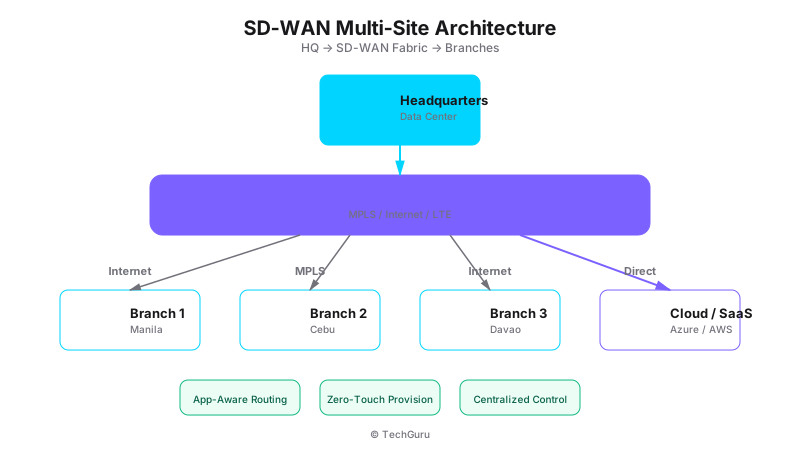
[Architecture Diagram: /images/blog/sdwan-architecture.svg]
SD-WAN (Software-Defined Wide Area Network) replaces expensive MPLS circuits with cheaper internet connections while maintaining reliability through intelligent path selection. For retail chains, it connects every branch to headquarters and cloud services.
Unlike traditional WAN, SD-WAN dynamically routes traffic across multiple connections. If one ISP goes down, traffic automatically shifts to the backup link. POS transactions keep flowing.
Why Retail Needs SD-WAN
Retail networks face unique challenges:
PCI compliance: Cardholder data must be encrypted and isolated. SD-WAN with microsegmentation makes this straightforward.
Multi-branch management: Managing 25+ firewalls individually is impossible. SD-WAN centralizes management.
Cost: MPLS circuits cost 3-5x more than broadband. For retail margins, that difference matters.
Cloud applications: POS systems, inventory management, and analytics tools increasingly run in the cloud. SD-WAN optimizes cloud access.
How to Design SD-WAN for Retail
Step 1: Hub-Spoke Architecture
For most retail chains, we use a hub-spoke model: Headquarters is the hub, branches are spokes. All traffic flows through the hub for inspection and routing.
FortiGate SD-WAN handles this natively. The hub runs a larger FortiGate (e.g., 600F) that terminates VPN tunnels from all branches. Each branch runs a smaller unit (e.g., 60F or 100F) that connects to the hub.
Step 2: Dual ISP at Each Branch
Each branch gets two internet connections from different ISPs. This provides redundancy and doubles bandwidth. FortiGate's SD-WAN feature automatically balances traffic across both links.
Configuration: Create SD-WAN zones with both WAN interfaces. Define health checks (ping to reliable endpoints). Configure traffic rules to prefer the primary link for critical traffic (POS) and balance best-effort traffic across both.
Step 3: PCI-Compliant Segmentation
PCI DSS requires cardholder data environment (CDE) isolation. On FortiGate, create separate zones for: POS network (CDE), Corporate network (office computers), Guest WiFi, IoT (cameras, sensors).
Firewall policies control traffic between zones. POS can reach the payment processor but nothing else. Guest WiFi can reach the internet but nothing internal.
Step 4: Centralized Management
Use FortiManager to manage all branch firewalls from headquarters. Push configuration templates to all branches simultaneously. Monitor health, alerts, and logs from a single dashboard.
This is a game-changer for retail IT. Instead of visiting each branch to make changes, you manage everything centrally.
Best Practices
1. Template-based deployment. Create a standard branch configuration template. Deploy new branches by applying the template with site-specific details.
2. Monitor POS traffic separately. Create specific SD-WAN rules to prioritize POS transactions. They should never queue behind YouTube traffic.
3. Implement automatic failover testing. Schedule weekly tests to verify backup links are working. We've seen backup links fail silently for months.
4. Use application-based routing. Route POS traffic over the primary link, video conferencing over the link with lower latency, and general browsing over whichever has capacity.
Common Mistakes
Mistake 1: Using consumer-grade broadband. Business-grade SLAs with guaranteed uptime are worth the extra cost for retail.
Mistake 2: Not encrypting branch-to-hub traffic. Even though it goes over the internet, all traffic between branches and headquarters must be encrypted.
Mistake 3: Overlooking local internet breakout. Not all traffic needs to go through the hub. Let branch users access cloud services directly for better performance.
Conclusion
SD-WAN transforms retail networking from a cost center into a competitive advantage. Lower costs, better reliability, centralized management, and PCI compliance - all in one solution. Start with a pilot at 2-3 branches, then roll out across the chain.
Want to go deeper? Explore [Run infrastructure services](/en/products/run), [industry solutions](/en/solutions), or [contact our team](/en/contact).
FAQ
Q: Can SD-WAN replace MPLS completely? A: For most retail use cases, yes. MPLS still has value for ultra-low-latency applications, but broadband + SD-WAN covers 95% of retail needs.
Q: How do I handle PCI compliance with SD-WAN? A: Segment your CDE into a separate zone on FortiGate. Encrypt all cardholder data in transit. Document the segmentation for your QSA.
Q: What internet speed do I need per branch? A: Minimum 100 Mbps per ISP for a typical retail branch. For larger stores with many IoT devices, consider 200+ Mbps.
Q: How long does deployment take per branch? A: With templates: 1-2 days per branch. Initial setup of the hub and templates: 1-2 weeks.
Network Design Principles
Good network design follows the principle of least privilege and defense in depth. Segment your network into zones: management, production, DMZ, and guest. Each zone should have its own VLAN, subnet, and firewall rules. Traffic between zones should be explicitly allowed and logged.
For enterprise networks, we recommend a spine-leaf architecture for the core network. This provides predictable latency, easy scaling, and no single point of failure. Use 25GbE or 100GbE for spine-leaf connections, and 10GbE or 25GbE for server connections.
Monitoring and Observability
You cannot manage what you cannot measure. Deploy monitoring for three layers: infrastructure (CPU, memory, disk, network), application (response time, error rate, throughput), and business (user satisfaction, transaction volume, revenue impact).
Recommended tools: Prometheus + Grafana for metrics, ELK Stack for logs, Jaeger for distributed tracing. For commercial options, consider Datadog, New Relic, or Dynatrace. Budget 5-10% of your infrastructure cost for monitoring tools.
Automation and Infrastructure as Code
Manual configuration is error-prone and slow. Adopt Infrastructure as Code (IaC) for all network and server configurations. Tools like Terraform, Ansible, and Puppet allow you to version control your infrastructure, replicate environments, and recover quickly from failures.
Start small: automate your most common operations tasks first (server provisioning, VLAN creation, firewall rule management). Build a library of reusable modules and templates. Over time, expand automation to cover monitoring, alerting, and incident response.
WiFi 6/6E Deployment Guide
WiFi 6 (802.11ax) is not just faster WiFi - it fundamentally changes how wireless networks handle dense environments. Key features: OFDMA (simultaneous multi-user transmission), BSS Coloring (reduced interference), and Target Wake Time (better battery life for IoT).
Deployment best practices: Site survey first - understand your physical environment before placing access points. Use 20MHz channels in 2.4GHz for compatibility, 80MHz channels in 5GHz for performance. Enable band steering to move capable devices to 5GHz.
For WiFi 6E (6GHz band): Use it for high-performance devices only. The 6GHz band has shorter range but less interference. Ideal for conference rooms, offices with many wireless devices, and real-time applications like video conferencing.
SD-WAN Architecture Patterns
We have deployed SD-WAN for enterprises with 5-500 branches. The most common architecture patterns include: Hub-and-spoke (centralized traffic through headquarters), Full mesh (direct branch-to-branch), and Hybrid (hub-and-spoke with direct path for specific applications).
Choose your pattern based on application requirements. If all applications are cloud-hosted (Microsoft 365, Salesforce), full mesh or direct internet access is best. If applications are hosted in the data center, hub-and-spoke works well. For mixed environments, use application-aware routing.
SD-WAN sizing: Each branch needs bandwidth equal to (number of users x 2Mbps) + (number of cloud apps x 5Mbps). A 50-user branch needs approximately 350Mbps of internet bandwidth.