
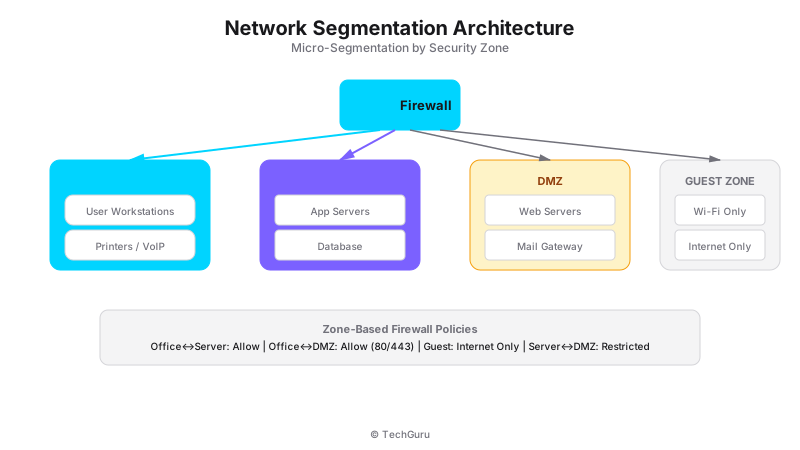
When the WannaCry ransomware hit in 2017, companies with flat networks lost everything. Companies with proper segmentation contained the damage to a single VLAN. That's the difference between a minor incident and a catastrophe.
Network segmentation is dividing your network into isolated zones. Each zone has its own security policies. If one zone is compromised, the attacker can't move to others. Here's how to do it right.
What is Network Segmentation?
[Architecture Diagram: /images/blog/network-segmentation.svg]
Network segmentation is the practice of dividing a network into smaller, isolated segments. Each segment has its own security policies and access controls. Traffic between segments passes through a firewall or router that inspects and filters it.
Microsegmentation takes this further by creating segments around individual workloads or applications, not just network zones. It's the Zero Trust approach to segmentation.
Why Segmentation Matters
Lateral movement is how small breaches become catastrophic. The 2023 MOVEit breach affected thousands of organizations because attackers moved laterally from one compromised server to others.
Segmentation limits lateral movement. If the marketing VLAN is compromised, attackers can't reach the finance VLAN. The blast radius is contained to the segment.
Compliance requirements drive segmentation too. PCI DSS requires cardholder data on its own segment. HIPAA requires patient data isolation. GDPR requires data protection by design.
How to Implement Network Segmentation
Step 1: Identify Your Segments
Common segments for most organizations: Management (firewall/switch management), Servers (application and database servers), Workstations (office computers), VoIP (IP phones), IoT (cameras, sensors, smart devices), Guest (visitor WiFi), DMZ (public-facing services).
For PCI compliance, you'll also need: CDE (Cardholder Data Environment) and P2PE (Point-to-Point Encryption) segments.
Step 2: Design Your VLAN Structure
Map segments to VLANs. We use a consistent numbering scheme across all client sites:
VLAN 10-19: Management. VLAN 20-29: Servers. VLAN 30-39: Workstations. VLAN 40-49: VoIP. VLAN 50-59: Guest. VLAN 60-69: IoT. VLAN 100+: DMZ and special segments.
Step 3: Configure FortiGate Zones
On FortiGate, create zones for each segment. Assign VLAN interfaces to zones. Then create firewall policies between zones.
Example policies: Workstations to Internet: Allow. Workstations to Servers: Allow only specific ports (443, 8443). Guest to Internet: Allow. Guest to Internal: Deny all. IoT to Internet: Allow limited. IoT to Servers: Deny all.
Step 4: Implement East-West Traffic Inspection
Most firewalls only inspect north-south traffic (internet to internal). East-west traffic (server to server, VLAN to VLAN) often passes uninspected.
FortiGate handles this by creating policies between internal zones. Every inter-VLAN connection goes through the firewall. This adds visibility and control to east-west traffic.
Step 5: Monitor and Audit
Segmentation is only effective if it's maintained. Monitor inter-segment traffic for anomalies. Audit firewall rules quarterly. Remove unused rules. Test segmentation by attempting unauthorized cross-segment access.
Best Practices
1. Default deny between segments. Every segment should deny all traffic by default, then allow only what's needed.
2. Use naming conventions. Standardize segment and VLAN names across the organization. It makes troubleshooting and audits easier.
3. Document everything. Maintain a current map of segments, VLANs, and inter-segment policies. This is required for compliance audits.
4. Test regularly. Attempt cross-segment access to verify segmentation works. We use automated tools for this.
5. Plan for growth. Design segments with room for expansion. It's easier to add a new VLAN than to restructure existing ones.
Common Mistakes
Mistake 1: Over-segmentation. Too many segments create management overhead. Start with 5-7 segments and add more as needed.
Mistake 2: No east-west inspection. If you only filter internet traffic, internal attackers can move freely. Inspect inter-VLAN traffic too.
Mistake 3: Not updating segmentation. As you add applications and services, update your segment policies. Stale segmentation creates gaps.
Conclusion
Network segmentation is a foundational security practice. It limits breach impact, meets compliance requirements, and improves network performance. Start with basic VLAN segmentation, then move to microsegmentation for critical assets.
Want to go deeper? Explore [Protect security services](/en/products/protect), [industry solutions](/en/solutions), or [get a security assessment](/en/contact).
FAQ
Q: How many segments do I need? A: Most organizations need 5-7: management, servers, workstations, guest, IoT, DMZ, and optionally VoIP. Add specialized segments for compliance (PCI CDE).
Q: Does segmentation slow down the network? A: Minimal impact. Inter-segment traffic goes through the firewall, which adds latency. But modern firewalls handle this at wire speed.
Q: Can I segment a wireless network? A: Yes. Assign different SSIDs to different VLANs. Corporate WiFi goes to the workstation VLAN. Guest WiFi goes to the guest VLAN.
Q: What's the difference between VLANs and microsegmentation? A: VLANs segment at the network layer (switch ports). Microsegmentation segments at the workload level (individual VMs or containers). Both are useful.
Threat Landscape and Current Attack Vectors
Understanding the current threat landscape is essential for making informed security decisions. In 2025, the most common attack vectors include ransomware (up 150% from 2024), supply chain attacks (targeting software vendors and managed service providers), credential stuffing (exploiting password reuse across services), and zero-day exploits (targeting unpatched vulnerabilities).
According to the 2025 Verizon Data Breach Investigations Report, 68% of breaches involve a human element (phishing, stolen credentials, or errors). This means technology alone is not enough - you need people, processes, AND technology working together.
Implementation Roadmap
We recommend a phased approach to implementation. Phase 1 (Weeks 1-4): Assessment and design. Document current state, identify gaps, design target architecture. Phase 2 (Weeks 5-8): Deploy core components. Install and configure the primary solution in a test environment. Phase 3 (Weeks 9-12): Pilot testing. Deploy to 20-30% of users, collect feedback, refine configuration.
Phase 4 (Weeks 13-16): Full deployment. Roll out to remaining users with minimal disruption. Phase 5 (Weeks 17-20): Optimization. Fine-tune policies, optimize performance, and document procedures. This timeline works for most medium enterprises (200-500 users).
Compliance and Regulatory Considerations
If your organization is subject to regulatory requirements (PCI DSS, HIPAA, ISO 27001, GDPR), ensure your implementation addresses these requirements from the start. Retrofitting compliance is significantly more expensive than building it in. We recommend creating a compliance matrix that maps each regulatory requirement to specific technical controls.
Common compliance gaps we see: insufficient audit logging (PCI DSS requires 12 months of logs), missing encryption at rest (required by HIPAA and GDPR), inadequate access controls (required by ISO 27001), and missing incident response procedures (required by all frameworks).