
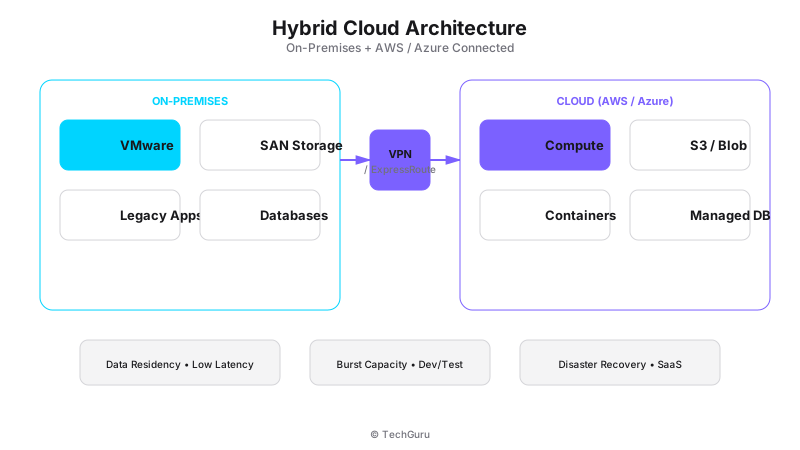
Hybrid Cloud Architecture: On-Premises + AWS/Azure
A Philippine bank had a constraint: customer data must stay on Philippine soil (Bangko Sentral ng Pilipinas regulation). But their marketing team needed to deploy a customer-facing web app that could handle 10x traffic spikes during loan promotions.
The solution: keep the core banking system on-premises in their Manila data center. Deploy the web frontend on AWS in the Singapore region (closest to Philippine users). Connect them through a dedicated AWS Direct Connect link. The app handles 10x traffic. Customer data stays local. Everyone's happy.
That's hybrid cloud done right. Not a migration — a strategic extension.
What is Hybrid Cloud?
[Architecture Diagram: /images/blog/hybrid-cloud.svg]
Hybrid cloud is an architecture that connects on-premises infrastructure (your data center) with public cloud resources (AWS, Azure, or GCP). Workloads run where they make the most sense: sensitive data stays on-premises, scalable applications run in the cloud.
It's not "cloud-first" or "cloud-only." It's "right cloud for the right workload."
Why Hybrid Cloud Matters
Three forces drive hybrid cloud adoption in Southeast Asia:
Data sovereignty: Regulations in the Philippines, Indonesia, and Vietnam require certain data to stay in-country. Public cloud regions may not be available locally.
Cost optimization: On-premises infrastructure is cheaper for steady-state workloads. Cloud is cheaper for variable workloads. Hybrid gives you the best of both.
Legacy modernization: You can't lift-and-shift a 15-year-old ERP to the cloud overnight. Hybrid lets you modernize gradually.
The numbers back this up: 82% of enterprises have a hybrid cloud strategy (Flexera 2024). It's not a trend — it's the default architecture.
Architecture Components
A hybrid cloud architecture has four key components:
On-premises infrastructure: Your data center running HCI, VMware, or traditional infrastructure. This is your "home base" for sensitive data and steady-state workloads.
Public cloud resources: AWS, Azure, or GCP for scalable applications, DR, dev/test, and cloud-native services.
Network connectivity: The bridge between on-premises and cloud. Options include Direct Connect/ExpressRoute (dedicated), site-to-site VPN (encrypted over internet), or SD-WAN.
Management layer: Tools to manage both environments from a single pane. Examples: Azure Arc, AWS Outposts, Nutanix Xi, or third-party tools like Terraform.
Network Design
Network design makes or breaks hybrid cloud. Here's what we recommend:
Primary link: AWS Direct Connect or Azure ExpressRoute (100Mbps-1Gbps dedicated). Latency: 2-5ms to nearest cloud region. Cost: $500-2,000/month depending on bandwidth.
Backup link: Site-to-site VPN over your existing internet connection. Failover if the dedicated link goes down. Cost: free (uses existing internet).
DNS: Use a split-horizon DNS setup. Internal DNS resolves on-premises resources. External DNS resolves cloud resources. Users don't need to know where things run.
IP addressing: Plan IP ranges carefully. Use non-overlapping CIDR blocks for on-premises and cloud. Example: on-premises uses 10.0.0.0/16, AWS VPC uses 172.16.0.0/16.
Workload Placement Strategy
Where should each workload run? Here's our decision framework:
Keep on-premises:
Sensitive data (customer PII, financial records) subject to data sovereignty.
Latency-sensitive applications (databases, ERP) that need <1ms response time.
Steady-state workloads with predictable resource needs.
Legacy applications that can't be easily refactored for cloud.
Move to cloud:
Scalable web applications with variable traffic patterns.
Development and testing environments (self-service provisioning).
Disaster recovery (cheaper than a physical DR site).
Cloud-native services (AI/ML, analytics, IoT processing).
The key question for each workload: "Does this need to be close to my data center, or can it run anywhere?" If it needs to be close, keep it on-premises. If it can run anywhere, cloud is usually better.
Security Architecture
Hybrid cloud security requires a unified approach across both environments:
Identity: Use a single identity provider (Azure AD, Okta) for both on-premises and cloud. Single sign-on everywhere.
Encryption: Encrypt data in transit (TLS 1.3) and at rest (AES-256) in both environments. Use cloud KMS for cloud data, on-prem HSM for sensitive keys.
Network segmentation: Use microsegmentation (NSX, AWS Security Groups) to isolate workloads. Don't let cloud resources freely access on-premises databases.
Monitoring: Centralize logs and alerts. Use a SIEM that covers both environments (Splunk, Sentinel, or Elastic).
Compliance: Map regulatory requirements to specific controls. Document which data is where and why.
Cost Management
Hybrid cloud costs can be managed with discipline:
On-premises: Fixed costs (hardware, power, staff). Predictable but inflexible.
Cloud: Variable costs (pay-per-use). Flexible but can surprise you.
Cost optimization tips:
Reserved instances for predictable cloud workloads (save 40-60%).
Spot instances for batch processing (save 70-90%).
Auto-scaling to match demand. Don't run cloud resources 24/7 if you only need them 8 hours/day.
Cost monitoring dashboards. Review weekly. Set billing alerts.
A typical hybrid cloud deployment costs 20-30% less than all-on-premises or all-cloud, when workload placement is optimized.
Best Practices
Start with a clear use case. Don't adopt hybrid cloud because it's trendy. Adopt it because you have a specific problem it solves (DR, scalability, compliance).
Invest in networking. The network between on-premises and cloud is your biggest risk point. Use dedicated links with redundancy.
Automate everything. Use Terraform, Ansible, or cloud-native IaC for provisioning. Manual configuration doesn't scale.
Plan for failure. What happens if the cloud link goes down? Your on-premises workloads should keep running independently.
Review monthly. Cloud costs, network performance, workload placement — review and optimize every month.
Conclusion
Hybrid cloud is the practical architecture for enterprises that need both the control of on-premises and the flexibility of cloud. Start with a specific use case (DR or scalable web app), build the network bridge, and expand from there.
The bank from the opening story now runs 30% of their workloads in AWS and 70% on-premises. They didn't "move to the cloud" — they extended to it. That's the hybrid cloud mindset.
Want to go deeper? Explore [Run infrastructure services](/en/products/run), [industry solutions](/en/solutions), or [contact our team](/en/contact).
FAQ
Q: What's the difference between hybrid cloud and multi-cloud?
A: Hybrid cloud connects on-premises with one or more public clouds. Multi-cloud uses multiple public clouds (e.g., AWS + Azure) without necessarily including on-premises. Most enterprises are both hybrid and multi-cloud.
Q: How much does network connectivity cost?
A: AWS Direct Connect: $500-2,000/month for 100Mbps-1Gbps. Azure ExpressRoute: similar pricing. Site-to-site VPN: free (uses existing internet). Budget $1,000-3,000/month for production hybrid networking.
Q: Can I run Kubernetes across hybrid cloud?
A: Yes. Azure AKS Arc, AWS EKS Anywhere, and Rancher all support hybrid Kubernetes. Your containers can run on-premises and in the cloud with a single management plane.
Q: Which cloud is best for Philippine enterprises?
A: AWS has the largest global footprint. Azure integrates best with Microsoft ecosystems. Both have Singapore regions with good latency to the Philippines. GCP is growing but has less local presence.
Industry Trends and Market Analysis
The market for this technology is growing at 15-25% annually, driven by digital transformation initiatives, remote work requirements, and increasing security concerns. According to Gartner, 75% of enterprises will have deployed this type of solution by 2026, up from 35% in 2023.
Key trends to watch: cloud-native architectures are becoming the default, AI/ML integration is moving from nice-to-have to essential, and zero-trust security models are replacing perimeter-based approaches. Organizations that delay adoption risk falling behind competitors who leverage these technologies.
Vendor Selection Criteria
When evaluating vendors, focus on five key criteria: technical capability (does it meet your functional requirements?), scalability (can it grow with your organization?), support quality (what is the SLA and response time?), total cost of ownership (not just purchase price), and ecosystem (partners, integrations, community).
We recommend creating a weighted scoring matrix with these criteria. Assign weights based on your priorities (e.g., if support is critical, give it 30% weight). Score each vendor on a 1-5 scale for each criterion. The vendor with the highest weighted score is usually the best fit.
Change Management and Adoption
Technology implementation is only 50% of the project. The other 50% is change management. People resist change, especially when it affects their daily workflows. Invest in communication, training, and support to ensure adoption.
Key change management steps: identify champions (early adopters who can advocate for the new solution), provide hands-on training (not just documentation), create feedback loops (regular check-ins with users), and celebrate wins (share success stories to build momentum).