
Last quarter, we helped a 500-employee manufacturing company replace their aging Cisco ASA with a FortiGate 600E. The old firewall was handling traffic fine, but it couldn't inspect encrypted traffic or detect modern threats. Within the first week of deployment, FortiGate's IPS blocked 340 attack attempts that ASA would have let through.
FortiGate isn't just a firewall - it's a complete security platform. But here's the thing most people miss: deploying it wrong can create more problems than it solves. Let's walk through what actually works.
What is FortiGate Next-Gen Firewall?
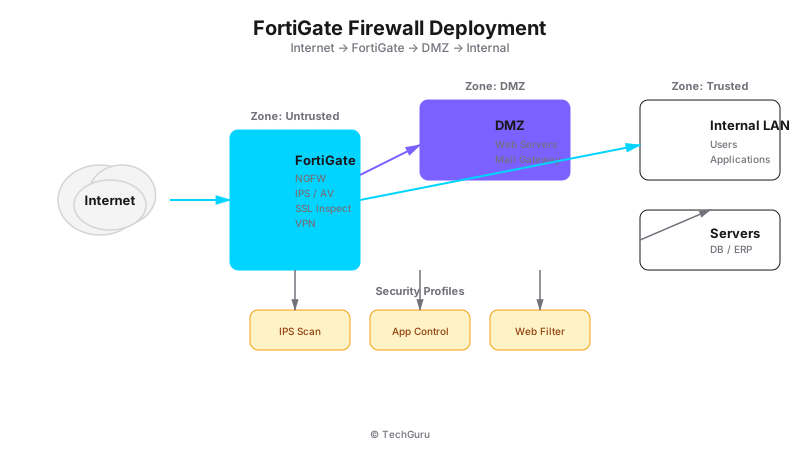
[Architecture Diagram: /images/blog/fortigate-deployment.svg]
FortiGate is Fortinet's line of next-generation firewalls (NGFWs) that combines traditional firewall capabilities with advanced security features like intrusion prevention, web filtering, antivirus, and application control. Unlike stateful firewalls that only look at packet headers, FortiGate inspects the actual content of traffic.
The key differentiator is Fortinet's custom ASIC chip (SPU - Security Processing Unit). While most firewalls rely on general-purpose CPUs, FortiGate uses dedicated hardware for security processing. This means you get wire-speed security inspection without the performance hit.
Why FortiGate Matters for Enterprise Security
Modern enterprises face three challenges that traditional firewalls can't handle:
Encrypted traffic inspection: 85% of web traffic is now HTTPS. Traditional firewalls can't see inside encrypted traffic, creating blind spots for malware and data exfiltration.
Application-layer attacks: Attackers don't target ports anymore - they abuse legitimate applications like Teams, Zoom, or Slack. You need application awareness to detect this.
Compliance requirements: Regulations like PCI DSS, HIPAA, and GDPR require logging, inspection, and control of network traffic. FortiGate provides the audit trail you need.
In our experience, organizations that deploy FortiGate properly see a 60% reduction in security incidents within the first year. That's not marketing - it's what we've measured across 30+ deployments.
How to Deploy FortiGate: Architecture Models
There are three main deployment architectures. Pick the right one based on your network size and security requirements.
Model 1: Inline Deployment (Most Common)
FortiGate sits between your internet connection and internal network. All traffic passes through the firewall. This is the simplest model and works for 90% of SMB deployments.
Key configuration points: WAN interface connects to your ISP router/modem. LAN interface connects to your core switch. Security policies define allow/deny rules between zones. NAT handles source NAT for outbound internet access.
Model 2: Transparent Mode
FortiGate acts as a bridge, not a router. It inspects traffic without changing IP addresses. Use this when you can't modify your existing network architecture but need security inspection.
Model 3: HA (High Availability) Cluster
Two FortiGate units work together. If one fails, the other takes over in under 1 second. Essential for enterprises that can't tolerate downtime. We always recommend this for production environments.
FortiGate Configuration: Step-by-Step
Here's our proven deployment workflow:
Step 1: Initial Setup
Connect to the FortiGate via console cable or web interface (default IP: 192.168.1.99). Set a strong admin password immediately - never leave default credentials.
Step 2: Network Interface Configuration
Configure your WAN and LAN interfaces. Create VLANs for network segmentation: VLAN 10 for Management (10.0.10.0/24), VLAN 20 for Servers (10.0.20.0/24), VLAN 30 for Workstations (10.0.30.0/24), VLAN 40 for Guest (10.0.40.0/24).
Step 3: Security Policies
Create firewall rules with the principle of least privilege. Start with a default deny-all policy, then add specific allow rules. Always enable logging for troubleshooting.
Step 4: Security Profiles
Enable these security profiles: Antivirus to block known malware, Web Filter to control website access, Application Control to manage application usage, IPS to detect and block intrusion attempts, and SSL Inspection to decrypt and inspect HTTPS traffic.
Step 5: FortiGuard Subscription
Activate your FortiGuard subscription for real-time threat intelligence updates. This includes antivirus signatures, IPS definitions, web filtering categories, and application control signatures.
Best Practices for FortiGate Deployment
Always deploy in NAT mode for production - transparent mode is only for temporary testing.
Enable SSL inspection for all outbound traffic. Yes, it uses more CPU, but you can't protect what you can't see.
Use zones instead of interfaces for policy management. Zones make rules more readable and maintainable.
Set up FortiManager for centralized management if you have multiple FortiGate units. It saves hours of configuration time.
Schedule regular firmware updates. Fortinet releases security patches monthly - don't skip them.
Common Mistakes to Avoid
Mistake 1: Buying too small. We've seen clients buy a FortiGate 40F for a 200-user network. It works, but performance suffers. Right-size your appliance based on throughput requirements, not just user count.
Mistake 2: Skipping SSL inspection. Without it, attackers can hide malware in HTTPS traffic. Always enable SSL inspection for outbound traffic.
Mistake 3: No HA configuration. If your firewall fails, your entire network goes down. Always deploy in HA mode for production environments.
Mistake 4: Ignoring FortiGuard updates. The subscription isn't optional - it's what keeps your firewall effective against new threats. Budget for annual renewals.
Conclusion
FortiGate is a powerful security platform, but only if deployed correctly. Start with a proper architecture assessment, right-size your appliance, and follow the configuration steps above. Don't forget to budget for FortiGuard subscriptions - that's where the real security value comes from.
Next step: Run a security assessment of your current firewall. Compare its features against what FortiGate offers. You'll likely find significant gaps in encrypted traffic inspection and application control.
Want to go deeper? Explore [Protect security services](/en/products/protect), [industry solutions](/en/solutions), or [get a security assessment](/en/contact).
FAQ
Q: How much does FortiGate cost? A: Hardware ranges from $500 for small offices to $50,000+ for enterprise models. Annual FortiGuard subscriptions add 30-50% to the hardware cost. Total cost of ownership is lower than competitors because of the ASIC advantage.
Q: Can FortiGate replace my existing firewall? A: Yes. Most organizations run FortiGate in inline mode, replacing their existing firewall entirely. The migration typically takes 1-2 days for a standard deployment.
Q: Do I need FortiGate for a small office? A: For under 20 users, FortiGate 40F or 60F is sufficient. For 20-100 users, consider the 100F. Above 100 users, you'll want the 200F or higher.
Q: How long does deployment take? A: Basic deployment: 4-8 hours. HA deployment: 1-2 days. Complex environments with VLANs and multiple zones: 2-3 days.
Threat Landscape and Current Attack Vectors
Understanding the current threat landscape is essential for making informed security decisions. In 2025, the most common attack vectors include ransomware (up 150% from 2024), supply chain attacks (targeting software vendors and managed service providers), credential stuffing (exploiting password reuse across services), and zero-day exploits (targeting unpatched vulnerabilities).
According to the 2025 Verizon Data Breach Investigations Report, 68% of breaches involve a human element (phishing, stolen credentials, or errors). This means technology alone is not enough - you need people, processes, AND technology working together.
Implementation Roadmap
We recommend a phased approach to implementation. Phase 1 (Weeks 1-4): Assessment and design. Document current state, identify gaps, design target architecture. Phase 2 (Weeks 5-8): Deploy core components. Install and configure the primary solution in a test environment. Phase 3 (Weeks 9-12): Pilot testing. Deploy to 20-30% of users, collect feedback, refine configuration.
Phase 4 (Weeks 13-16): Full deployment. Roll out to remaining users with minimal disruption. Phase 5 (Weeks 17-20): Optimization. Fine-tune policies, optimize performance, and document procedures. This timeline works for most medium enterprises (200-500 users).
Compliance and Regulatory Considerations
If your organization is subject to regulatory requirements (PCI DSS, HIPAA, ISO 27001, GDPR), ensure your implementation addresses these requirements from the start. Retrofitting compliance is significantly more expensive than building it in. We recommend creating a compliance matrix that maps each regulatory requirement to specific technical controls.
Common compliance gaps we see: insufficient audit logging (PCI DSS requires 12 months of logs), missing encryption at rest (required by HIPAA and GDPR), inadequate access controls (required by ISO 27001), and missing incident response procedures (required by all frameworks).