
A CFO asked us last week: "We have antivirus. Why do we need EDR, XDR, AND MDR? Isn't that just paying three times for the same thing?"
Fair question. The security vendor ecosystem loves acronyms. Let's break down what each actually means and which one you actually need.
## What is EDR?
EDR (Endpoint Detection and Response) monitors your computers and servers for suspicious activity. It records everything happening on the endpoint and alerts you when something looks wrong.
EDR answers: "What happened on this computer?" It's like having a security camera with memory—you can rewind and see exactly what the attacker did.
## What is XDR?
XDR (Extended Detection and Response) takes EDR and expands it beyond endpoints. It correlates data from endpoints, networks, cloud, and email to give you a complete picture.
XDR answers: "What's the full attack story?" Instead of seeing just one piece of the puzzle, you see the entire attack chain.
## What is MDR?
MDR (Managed Detection and Response) is EDR/XDR as a service. Instead of your team monitoring alerts, a team of security experts does it for you 24/7.
MDR answers: "Who's watching when I'm not?" It's like having an outsourced security operations center.
## Why This Matters?
The average company takes 277 days to identify a breach. With EDR, you might catch it in a week. With XDR, in a day. With MDR, in minutes—because someone is always watching.
But here's the catch: each step up costs more. EDR might cost $10-15 per endpoint monthly. XDR jumps to $20-30. MDR can hit $50-100.
## How to Choose?
### Choose EDR if: - You have 2-3 security staff - Your budget is limited - You mainly need endpoint visibility - You're in a regulated industry that requires local data control
### Choose XDR if: - You have a small security team (3-5 people) - You need visibility across endpoints, network, and cloud - You want correlated alerts instead of noise - You're ready to invest in a unified platform
### Choose MDR if: - You have no security team or just 1 person - You need 24/7 monitoring - You can't afford to hire 3-5 security analysts - You want experts managing your security
## Best Practices
1. **Don't buy everything at once** - Start with EDR, prove value, then upgrade to XDR. 2. **Evaluate your team's capacity** - Be honest about how many hours your team can dedicate to security monitoring. 3. **Consider hybrid approaches** - Many companies use MDR for after-hours and EDR/XDR during business hours. 4. **Test before you buy** - Every vendor offers a free trial. Use it.
## Common Mistakes
**Mistake 1: Buying XDR when you need MDR** If your team can't handle EDR alerts, XDR won't help—it'll just give you more alerts. You need MDR.
**Mistake 2: Choosing based on vendor hype** Every vendor claims their XDR is "next-gen" or "AI-powered." Ignore the marketing. Focus on detection rates and response capabilities.
**Mistake 3: Not integrating with existing tools** EDR/XDR should work with your SIEM, firewall, and other security tools. If it doesn't integrate, you'll have blind spots.
## Conclusion
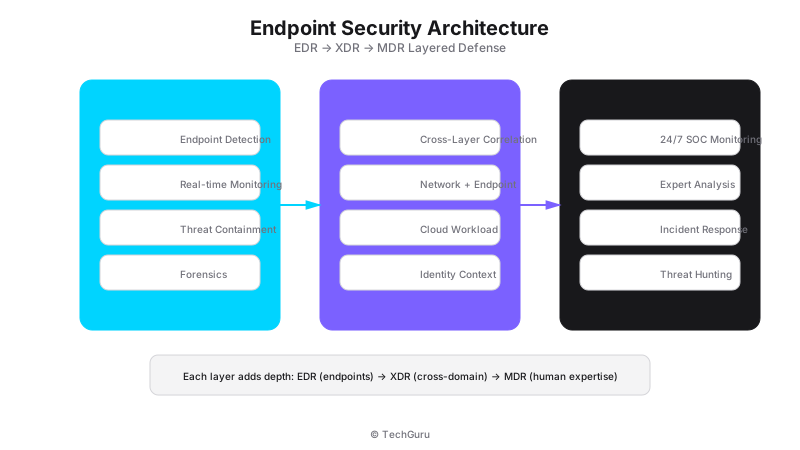
EDR, XDR, and MDR aren't competing—they're different levels of the same thing. EDR is the foundation. XDR extends it. MDR adds human expertise.
Start with what your team can manage. If you have 2-3 security people, EDR is fine. If you have nobody, MDR is your answer. Don't overbuy.
## FAQ
Q: Can I replace antivirus with EDR? A: Yes, and you should. Modern EDR includes antivirus capabilities plus much more.
Q: How long does it take to deploy EDR? A: Typically 1-2 weeks for a 200-endpoint environment. XDR takes longer due to integration.
Q: Is MDR more secure than doing it myself? A: For most companies, yes. MDR providers have larger security teams with more experience than you can hire in-house.
Threat Landscape and Current Attack Vectors
[Architecture Diagram: /images/blog/edr-xdr.svg]
Understanding the current threat landscape is essential for making informed security decisions. In 2025, the most common attack vectors include ransomware (up 150% from 2024), supply chain attacks (targeting software vendors and managed service providers), credential stuffing (exploiting password reuse across services), and zero-day exploits (targeting unpatched vulnerabilities).
According to the 2025 Verizon Data Breach Investigations Report, 68% of breaches involve a human element (phishing, stolen credentials, or errors). This means technology alone is not enough - you need people, processes, AND technology working together.
Implementation Roadmap
We recommend a phased approach to implementation. Phase 1 (Weeks 1-4): Assessment and design. Document current state, identify gaps, design target architecture. Phase 2 (Weeks 5-8): Deploy core components. Install and configure the primary solution in a test environment. Phase 3 (Weeks 9-12): Pilot testing. Deploy to 20-30% of users, collect feedback, refine configuration.
Phase 4 (Weeks 13-16): Full deployment. Roll out to remaining users with minimal disruption. Phase 5 (Weeks 17-20): Optimization. Fine-tune policies, optimize performance, and document procedures. This timeline works for most medium enterprises (200-500 users).
Compliance and Regulatory Considerations
If your organization is subject to regulatory requirements (PCI DSS, HIPAA, ISO 27001, GDPR), ensure your implementation addresses these requirements from the start. Retrofitting compliance is significantly more expensive than building it in. We recommend creating a compliance matrix that maps each regulatory requirement to specific technical controls.
Common compliance gaps we see: insufficient audit logging (PCI DSS requires 12 months of logs), missing encryption at rest (required by HIPAA and GDPR), inadequate access controls (required by ISO 27001), and missing incident response procedures (required by all frameworks).
Security Operations Center (SOC) Best Practices
Whether you build an in-house SOC or use a managed security service provider (MSSP), the fundamentals are the same. A SOC needs three things: visibility (you cannot protect what you cannot see), correlation (events from different sources tell a richer story), and response (detection without response is just watching).
For organizations with 200-500 employees, we typically recommend a hybrid SOC model: in-house analysts for day-to-day monitoring and incident triage, with an MSSP for after-hours coverage and specialized expertise (threat hunting, forensics). This provides 24/7 coverage at 40-60% lower cost than a fully in-house SOC.
Incident Response Playbook
Every organization needs a written incident response playbook. Here is the framework we use with our clients:
Phase 1: Preparation. Establish an incident response team with clear roles and responsibilities. Define severity levels (Critical/High/Medium/Low) with specific criteria. Set up communication channels (Slack channel, bridge line, email distribution list).
Phase 2: Detection and Analysis. When an alert fires, the first responder performs initial triage: Is this a true positive? What systems are affected? What is the blast radius? Document everything in your ticketing system.
Phase 3: Containment. Isolate affected systems immediately. For network-based attacks, block malicious IPs at the firewall. For malware, disconnect the host from the network. Do not power off systems - preserve forensic evidence.
Phase 4: Eradication and Recovery. Remove the root cause (malware, compromised account, vulnerable system). Restore from clean backups if necessary. Verify that the threat is completely eliminated before reconnecting systems.
Phase 5: Post-Incident Review. Within 48 hours of incident closure, conduct a blameless post-mortem. What went well? What could be improved? Update your playbook based on lessons learned.
Security Awareness Training
The best firewall in the world cannot stop an employee from clicking a phishing link. Security awareness training is your first line of defense. We recommend monthly training sessions (15-20 minutes each) covering: phishing recognition, password hygiene, safe browsing, and incident reporting.
Use simulated phishing campaigns to test effectiveness. Send realistic but harmless phishing emails to employees monthly. Track click rates and provide additional training to those who fall for simulations. Target: less than 5% click rate on simulated phishing.
Want to go deeper? Explore [Protect security services](/en/products/protect), [industry solutions](/en/solutions), or [get a security assessment](/en/contact).